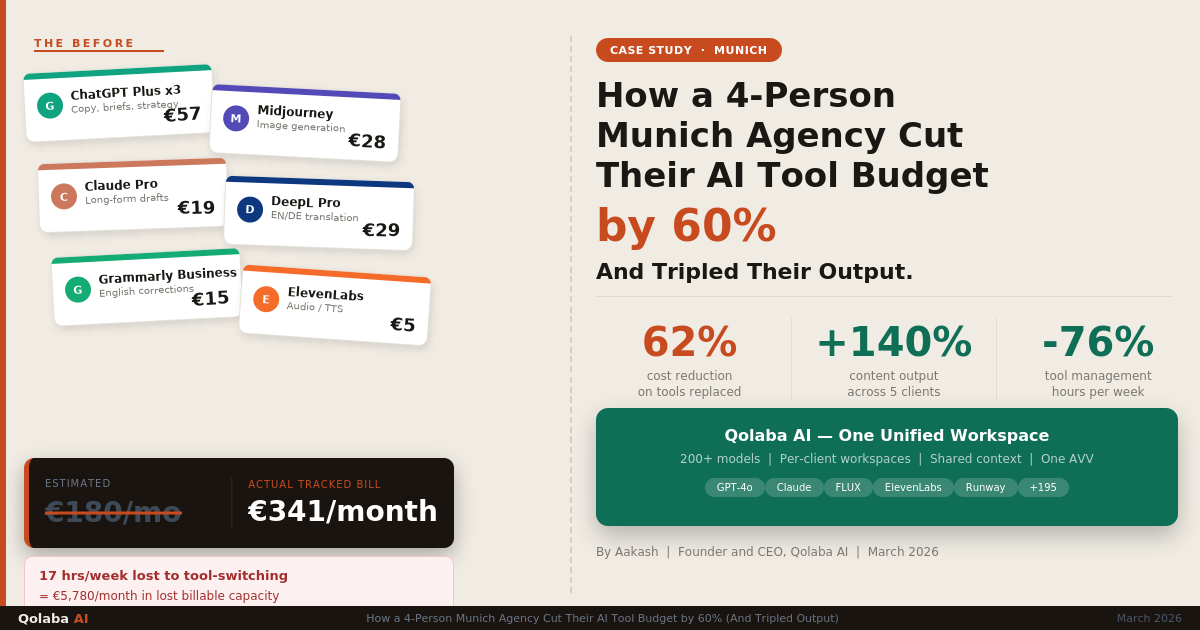

Here is how most German freelancers end up with five AI subscriptions: you start with ChatGPT because everyone is using it. Then you try Claude for a proposal and the writing is noticeably better, so you keep that too. A client needs a visual, so you add Midjourney. Your German keeps coming out slightly stiff, so DeepL Pro makes the list. Then someone in a LinkedIn comment recommends Perplexity for research and suddenly you are spending €80 a month on AI tools before you have billed a single hour of actual work. Congratulations. You now have a startup’s infrastructure and a freelancer’s budget.
None of those individual decisions were wrong. The problem is that nobody sat down and looked at them together. When you do, you find that three of those tools do roughly the same thing, one of them almost certainly creates a legal problem you haven’t thought about, and the whole stack could be replaced by a better-structured setup that costs significantly less and causes far fewer headaches on a Tuesday afternoon when you are switching between Client A’s tone and Client B’s brand guidelines and genuinely cannot remember which chat window is which.
This guide is for the solo operator managing multiple clients. Not the team, not the agency, just you. It covers what the five tools most German freelancers actually use really do, where they genuinely overlap, what DSGVO actually requires from you personally, and what a working multi-client setup looks like in practice. We also included Thomas’s workflow (a Berlin-based UX consultant, shared with his permission) because abstract advice is less useful than watching someone actually do it. See also: 5 Real Ways German Professionals Are Losing Time to Fragmented AI Tools.
The Solo Operator’s AI Problem
The challenge of being a solo operator is that you need the full range of AI capabilities (writing, research, visuals, client communication, admin) but you can only actually work in one tool at a time. And most AI tools were not designed with the context-switching a freelancer does between, say, 9am and noon on a Wednesday.
By noon, you might have drafted a proposal for a Frankfurt law firm, answered three client messages in different registers (one formal, one casual, one in German that needs to sound native and not like it was written by a very polite robot), responded to a brief from a Munich startup, and generated a cover image for a content piece. In a fragmented setup, that means five different browser windows, five different chat histories, and a genuinely exhausting amount of mental overhead keeping track of which instructions, tone, and client context belong where.
The context problem is not just inconvenient. It creates real errors. Freelancers regularly describe finishing a piece for Client A, starting one for Client B, and noticing only in review that traces of Client A’s voice (a phrase, a structural habit, an inexplicable fondness for Oxford commas) have crept in. With enough clients and enough AI usage, that kind of bleed becomes routine.
The problem isn’t the tools. It’s using five of them simultaneously for six different clients with no system to keep any of it separate.
The 5 AI Tools German Freelancers Use Most (and Where They Overlap)
Based on what freelancers in Germany are actually subscribing to in 2026, the usual stack looks something like this. The more important question is not what each one does in isolation, but where they duplicate each other and charge you separately for the privilege.
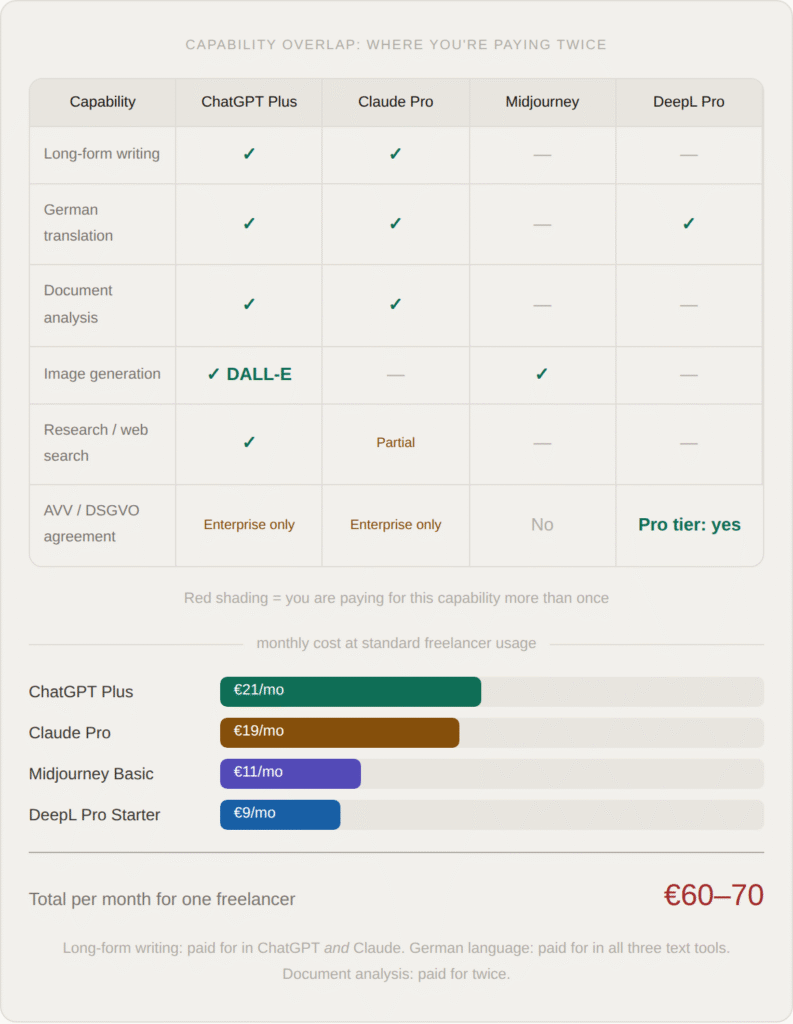
The overlap on writing and German language capability is the most expensive duplication. ChatGPT handles German adequately. Claude handles German better. DeepL handles it precisely, but specifically for translation. Most freelancers end up with all three, using each for slightly different tasks but paying full price for capabilities that substantially overlap. The honest audit most people avoid doing is asking: if I had to keep only two of these, which two, and what would I actually lose? The answer, for most people, is less than they expect and a fair amount of money per month.
The Multi-Client Workflow Problem
Every freelancer managing more than two clients has, at some point, given an AI tool the wrong context. You meant to write in the tone of Client B but you are still in Client A’s chat window. The instructions you carefully set up three days ago are buried under forty messages of unrelated work. The model has no idea that this particular client hates bullet points and always wants formal Sie. The model, bless it, is just doing its best.
This is not a small annoyance. It is a systematic flaw in how most consumer AI tools are designed, and it gets worse the more clients you have. Standard chat interfaces give you one global conversation history and no meaningful way to isolate one client’s context from another’s. You can name the chat window, but the model has no memory of what Client A’s brand voice sounds like when you switch to Client B’s window. You rebuild it every time, or you forget to, and it shows.
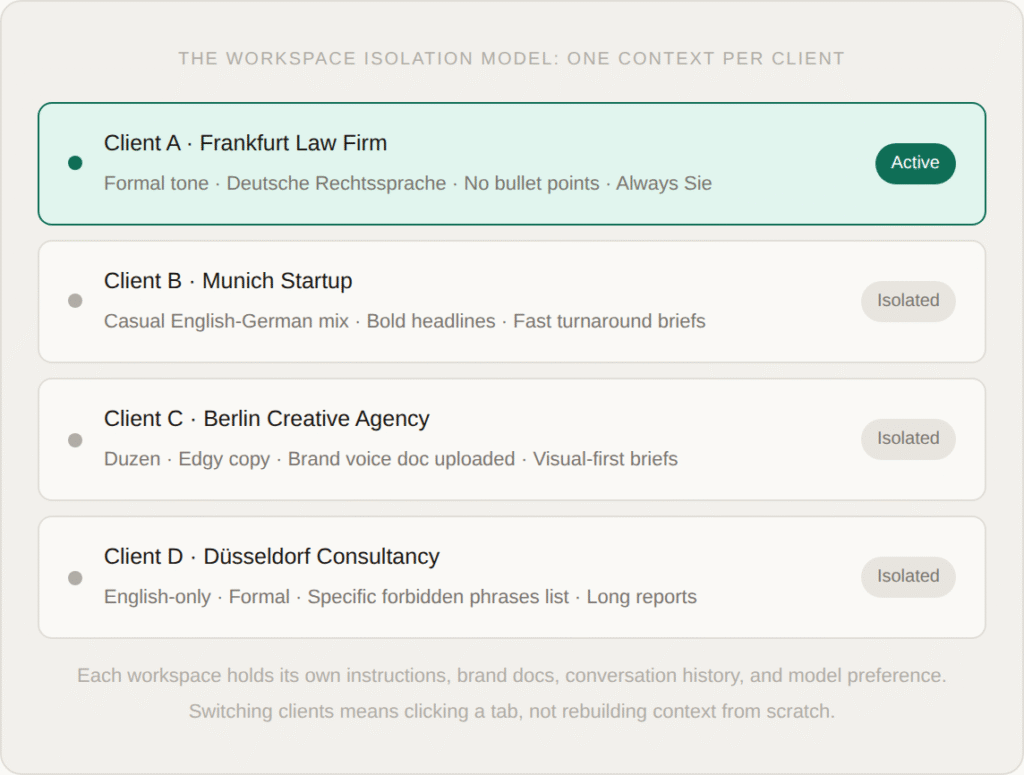
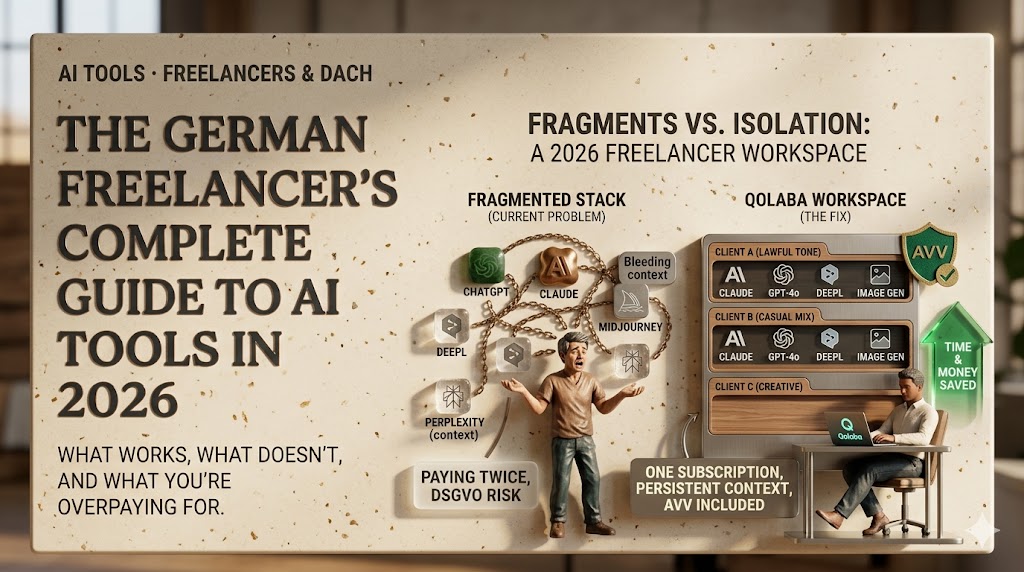
The solution is persistent, named workspaces: dedicated environments where each client’s instructions, uploaded documents, and conversation history live separately and stay there between sessions. When you open Client A’s workspace on Thursday, everything you set up on Monday is still intact. When you switch to Client B, you are in a completely different context. Nothing bleeds, nothing carries over, and you are not rebuilding the same setup from scratch every time you change clients.
This is the single most impactful structural change a multi-client freelancer can make. The persistent project workspaces in tools like Qolaba are designed specifically for this, but the principle applies regardless of platform: the unit of organisation should be the client, not the task.
The problem isn’t your memory. It’s that you’re using a tool designed for one person doing one thing at a time, for five clients doing five different things across six days.
DSGVO for Freelancers: What You’re Actually Responsible For
This is the section most freelancers skip. It is also the one that creates the most actual legal exposure, which is a fun combination. The key question is simple: are you processing personal data belonging to EU individuals in an AI tool? If the answer is yes (and it almost certainly is, if you are doing any client work involving names, email addresses, contact lists, customer feedback, or internal business data) then you need a valid Auftragsverarbeitungsvertrag (AVV) with every AI provider you are using for that work.
An AVV is a data processing agreement. It is the contract that says the AI provider will handle the personal data you pass through their system in a DSGVO-compliant way. Without it, you are the one holding the liability, not the provider. DSGVO Article 83 allows fines of up to €20 million or 4% of annual global turnover, whichever is higher. For a freelancer, that second number is not going to be the relevant one, but €20 million is still a large number to owe on a Tuesday.
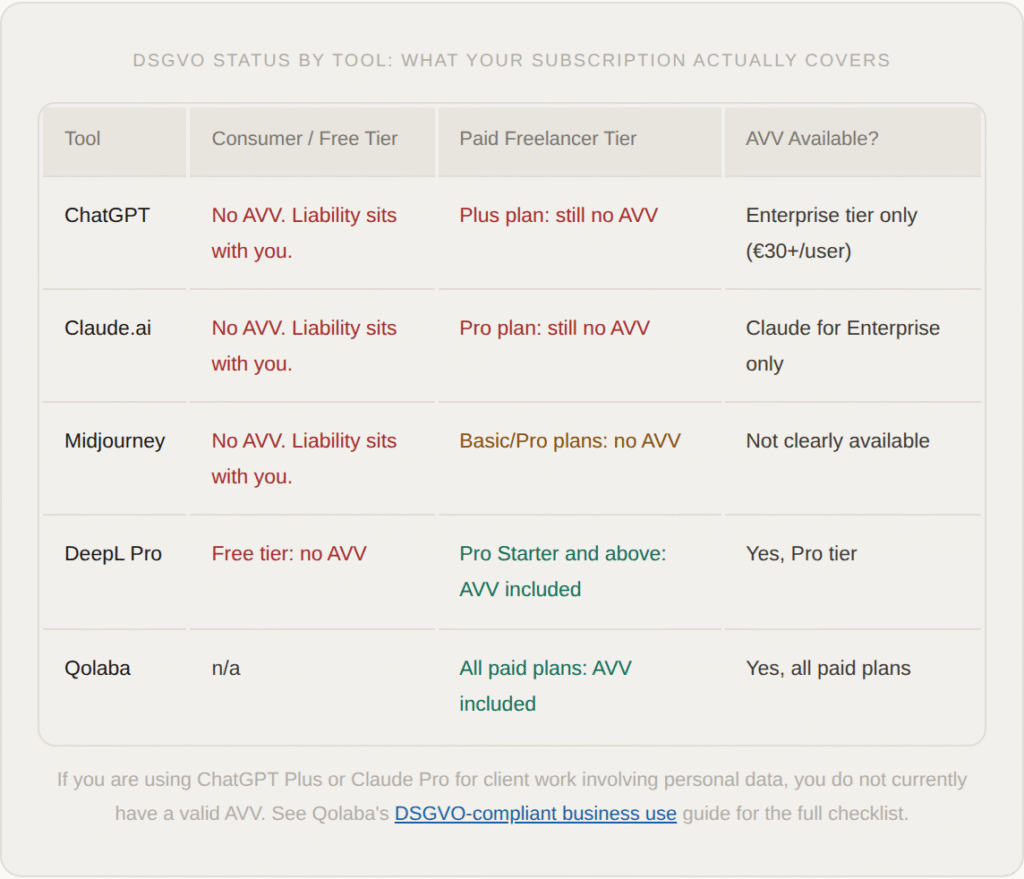
The practical implication for most freelancers is this: your current AI setup, the one that costs €60 a month, likely has no valid data processing agreement covering the client data you routinely pass through it. That is not theoretical risk. Clients in legal, finance, healthcare, and HR sectors increasingly ask their contractors to confirm their tool stack is DSGVO-compliant. The honest answer for most freelancers right now is no, and that conversation gets uncomfortable quickly.
The fix is not to stop using AI. It is to consolidate to tools where the paid tier includes an AVV (which dramatically narrows the field) and to stop pasting personal data into tools that don’t.
The Workspace Model: How to Run 5 Clients from One Tab
The workspace model is not a specific product recommendation. It is a way of thinking about AI setup. The idea is simple: every client gets a dedicated, persistent environment with its own instructions, its own uploaded documents, its own model preference, and its own history. You work inside that environment when you are doing work for that client. You close it when you switch.
The result is that you stop doing the two most time-consuming things that happen in a fragmented AI setup: rebuilding context from scratch each time (“write in the tone of a formal German law firm, the client hates bullet points, always use Sie, here are three examples of their previous communications…”) and doing mental gymnastics to keep client contexts from bleeding into each other.
What you get instead is a setup that behaves like a well-organised desk: each client has a drawer, the drawer has everything relevant in it, and you pull it out when you need it and put it back when you are done. The AI behaves consistently for each client because the instructions are persistent, not reconstructed.
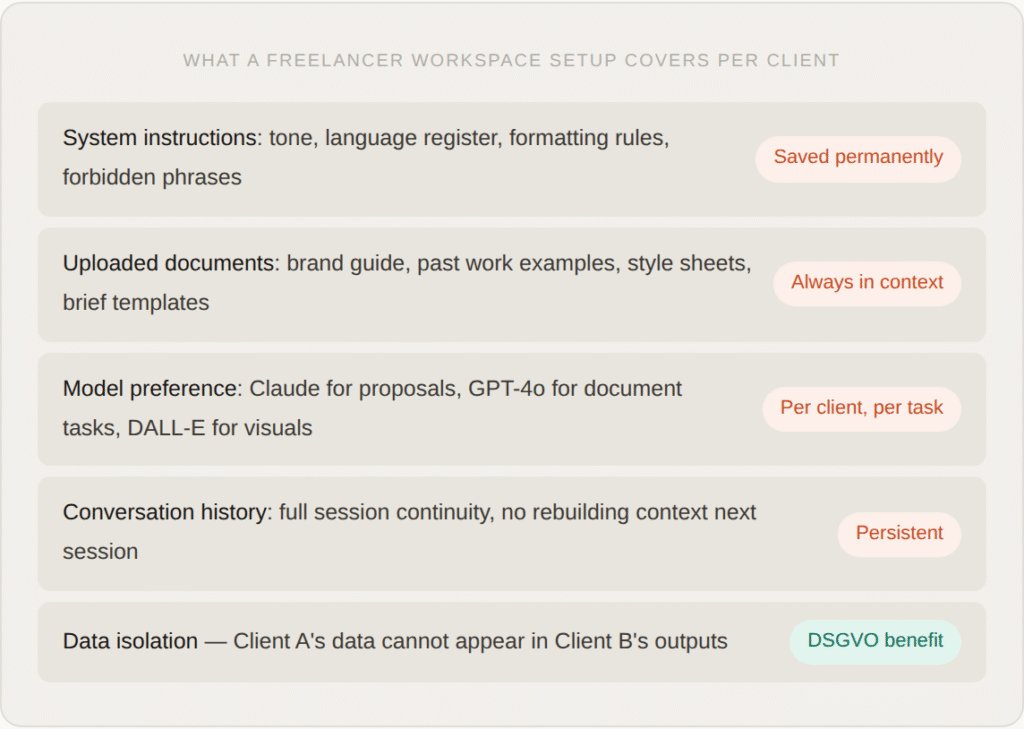
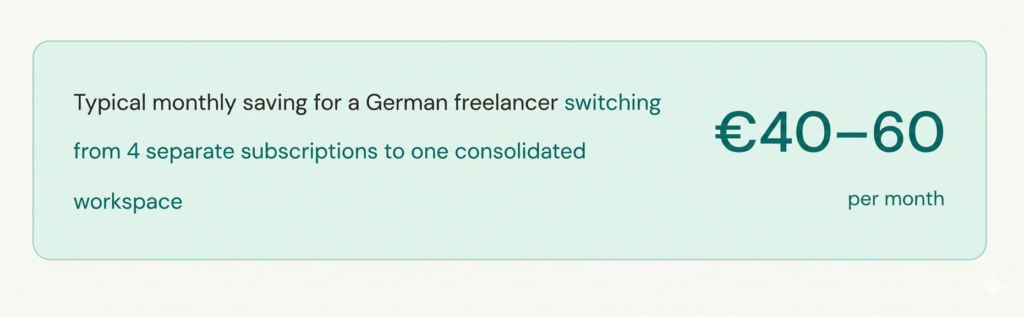
The other consequence of consolidating to a workspace model is that it typically collapses three or four separate subscriptions into one. If your workspace platform gives you access to 60+ AI models including Claude, ChatGPT, Gemini, and image generators, the separate ChatGPT Plus, Claude Pro, and Midjourney subscriptions become redundant. The cost saving is often €40–60 a month, and you end up with better DSGVO coverage and less context-switching overhead.
Thomas’s Actual Workflow (Step by Step)
Thomas is a UX consultant based in Berlin. He works with four clients simultaneously — a fintech startup, a mid-size retail chain, a public sector institution, and a Swiss design agency — and has agreed to share how he actually uses AI in his day-to-day work. This is not an idealised version. It is what he does on a Tuesday.
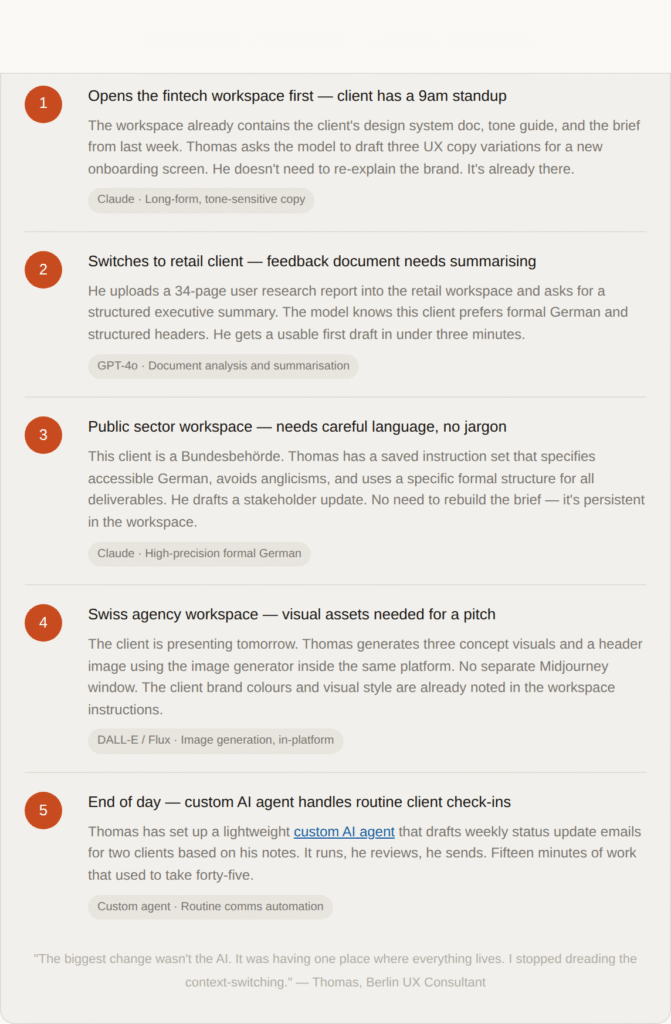
Thomas’s setup is not complicated. It is just structured. One platform with workspace isolation per client, access to multiple models depending on the task, and one subscription that covers all of it. His four client workspaces cost less per month than his previous stack of three separate subscriptions, and the DSGVO situation is cleaner because there is one platform, one data processing agreement, and one point of accountability.
The thing that took him the longest to set up, he says, was the initial workspace configuration for each client: uploading the brand docs, writing the system instructions, setting model preferences. That took about twenty minutes per client. Everything since then has been faster, not slower. The setup cost was a one-time investment that pays back every single session.
The biggest change wasn’t the AI. It was having one place where everything lives. I stopped dreading the context-switching.
Frequently Asked Questions
Most German freelancers juggle 3–5 tools: ChatGPT for general writing, Claude for longer documents and proposals, Midjourney or DALL-E for visuals, and Grammarly or DeepL for language polish. The problem is these tools overlap heavily — most freelancers are paying for the same capability twice across different subscriptions.
Most standard AI tools do not offer project isolation. Prompts and context bleed across sessions. Tools with persistent, named workspaces allow you to create a dedicated environment per client, preventing cross-contamination of instructions, tone, and data — and making DSGVO compliance significantly easier.
If you process personal data of EU individuals using an AI tool, you need a valid Auftragsverarbeitungsvertrag (AVV) with the AI provider. Consumer-tier accounts for ChatGPT and Claude do not include an AVV. Using them for client work involving personal data creates liability under DSGVO Article 83 — fines up to €20M or 4% of turnover. See the full DSGVO-compliant business use guide.
Yes. Platforms like Qolaba give access to 60+ AI models — including ChatGPT, Claude, Gemini, DALL-E, Flux, and others — under one subscription, one login, and one DSGVO-compliant agreement. For a solo freelancer running 3–6 clients, this typically saves €40–60/month versus maintaining separate subscriptions.
Try Qolaba Free — No Credit Card Required
250 credits on signup. Every AI model you need, in one workspace.
Start free at qolaba.ai285,000+ users · 60+ countries · DSGVO-compliant