

You’ve deployed AI across your teams. Marketing uses it for content creation. Sales leverages it for prospect research. Development speeds up coding with AI assistance.
But can you answer these questions: Which workflows deliver the most value? Who’s using AI effectively versus just experimenting? What’s your actual ROI on AI investments?
Without proper monitoring and analytics, you’re flying blind—unable to optimize what works or fix what doesn’t.
This guide shows you how to implement AI monitoring that transforms usage data into actionable insights.
Why Most Teams Fail at AI Monitoring
Organizations often treat AI as just another software tool. They track basic metrics like login frequency or number of queries, missing the deeper insights that drive real optimization.
Common monitoring mistakes:
- Vanity Metrics: Focusing on usage volume instead of value creation
- Data Silos: Each team tracks differently with no unified view
- Delayed Insights: Monthly reports when you need real-time visibility
- Missing Context: Raw numbers without workflow understanding
The result? Teams might use AI heavily but inefficiently. Others might have discovered game-changing workflows you can’t replicate because you don’t know they exist.
Building Your AI Monitoring Framework

Essential Metrics to Track
Usage Patterns
- Active users by team and role
- Peak usage times and patterns
- Query types and complexity
- Model selection preferences
Performance Indicators
- Response accuracy rates
- Task completion times
- Error and retry frequencies
- Output quality scores
Business Impact
- Time saved per workflow
- Cost per outcome achieved
- Quality improvements
- Revenue attribution where possible
Compliance and Security
- Data types processed
- PII detection incidents
- Access control violations
- Audit trail completeness
Creating Meaningful Dashboards
Your monitoring dashboard should answer three key questions:
- Who’s Using AI and How? Track adoption across teams, identifying power users and those needing support. Look for usage patterns that indicate successful workflows worth standardizing.
- What Value Is Being Created? Connect AI usage to business outcomes. If marketing generates 10 blog posts with AI, what’s the engagement compared to manual creation? If sales uses AI for research, how does it impact conversion rates?
- Where Are the Optimization Opportunities? Identify bottlenecks, inefficient workflows, and underutilized features. Find teams doing similar tasks differently and standardize best practices.
Advanced Analytics Strategies

Workflow-Level Tracking
Don’t just track individual AI interactions—monitor complete workflows:
Content Creation Workflow
- Initial prompt quality
- Number of iterations needed
- Time from start to publication
- Final output performance
Customer Service Workflow
- Query resolution time
- Customer satisfaction scores
- Escalation rates
- Knowledge base improvements
This workflow view reveals whether AI actually improves outcomes or just shifts work around.
ROI Calculation Models
Develop clear models for measuring AI return on investment:
Direct Cost Savings
- Hours saved × hourly rate
- Reduced external service costs
- Infrastructure optimization
Revenue Impact
- Faster time to market
- Increased production capacity
- Quality improvements leading to sales
Risk Mitigation
- Compliance violation prevention
- Error reduction value
- Security incident avoidance
Predictive Analytics
Use historical data to predict future needs:
- Forecast usage growth for capacity planning
- Identify training needs before problems arise
- Predict which teams will benefit from new features
- Anticipate compliance risks from usage patterns
Implementation Best Practices

Start with Baseline Measurements
Before implementing AI monitoring, establish baselines:
- Current process completion times
- Quality metrics for existing workflows
- Cost per outcome achieved
- Team productivity measures
Without baselines, you can’t prove AI impact.
Implement Progressive Monitoring
Phase 1: Basic Tracking (Weeks 1-2)
- User adoption rates
- Query volumes
- Basic usage patterns
Phase 2: Performance Metrics (Weeks 3-4)
- Task completion rates
- Error frequencies
- Time savings calculations
Phase 3: Business Impact (Weeks 5-6)
- ROI measurements
- Quality improvements
- Workflow optimization opportunities
Enable Self-Service Analytics
Empower teams to track their own AI performance:
- Provide team-level dashboards
- Create custom report builders
- Share best practice templates
- Enable peer comparisons
When teams can see their own metrics, they naturally optimize without top-down mandates.
Common Pitfalls to Avoid
- Over-Monitoring: Tracking everything creates noise. Focus on metrics that drive decisions.
- Privacy Violations: Monitor performance, not individual employee surveillance. Aggregate data where possible.
- Static Metrics: AI usage evolves rapidly. Review and update your metrics quarterly.
- Ignoring Qualitative Data: Numbers tell what happened, not why. Combine analytics with user feedback.
Taking Action with Insights
Monitoring without action wastes effort. Use your analytics to:
- Optimize Workflows: Identify and replicate high-performing patterns across teams
- Guide Training: Focus education on underutilized features or struggling teams
- Inform Purchasing: Make data-driven decisions about AI tool investments
- Ensure Compliance: Catch and correct risky behaviors before they become incidents
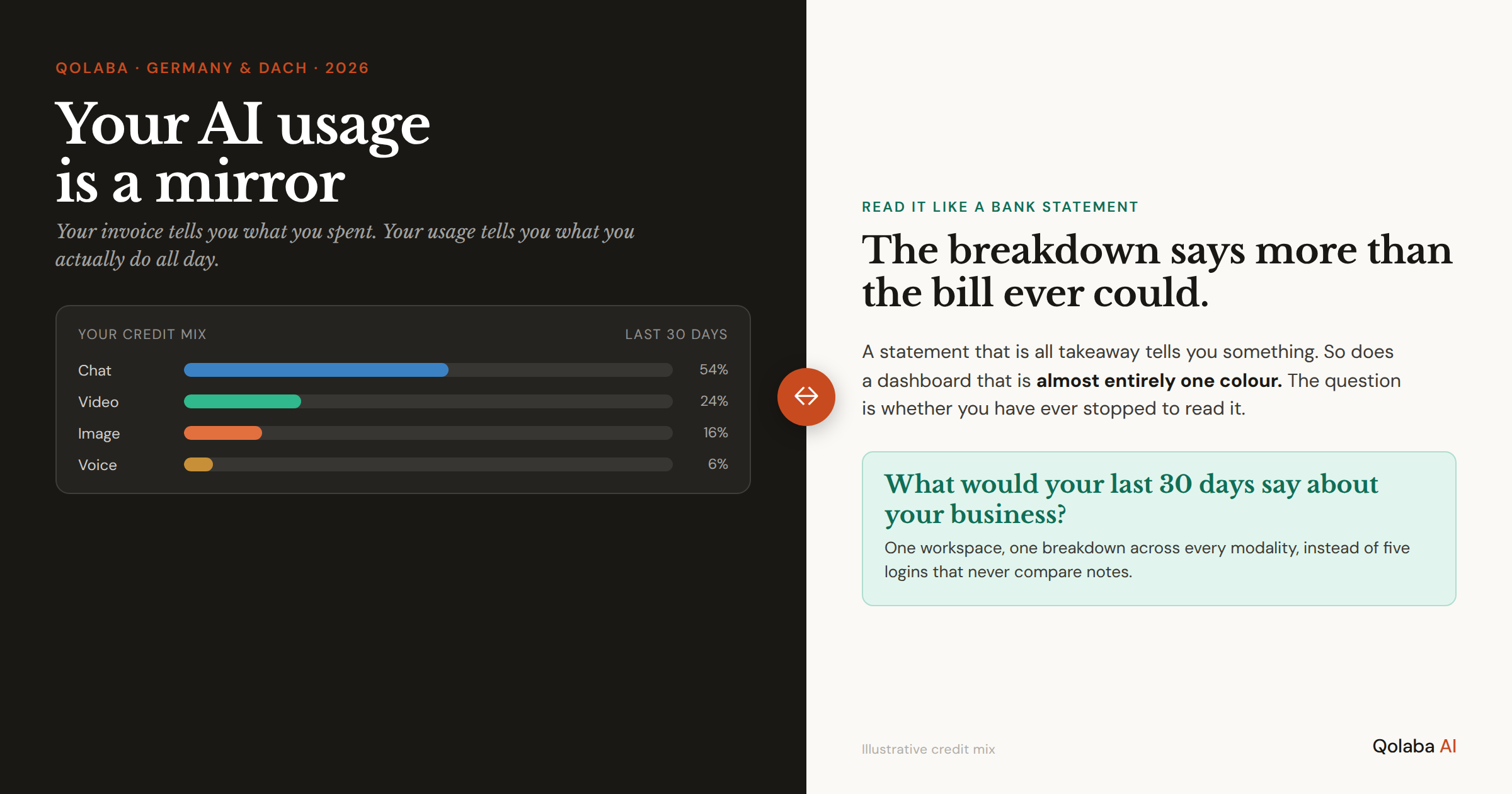
Ready to gain complete visibility into your AI operations? Platforms like Qolaba provide comprehensive analytics dashboards that track usage, performance, and ROI across all teams. With detailed monitoring of every AI interaction, workspace-level insights, and credit usage optimization tools, you can transform AI from an expense into a measurable competitive advantage—all while maintaining the flexibility teams need to innovate.